
Define conference meeting.What Is a Conference Meeting?
In today’s fast-paced business environment, effective communication and collaboration are essential to organizational success. Conference meetings serve as critical touchpoints where teams align on strategy, make important decisions, and drive organizational initiatives forward.
Whether you’re a business professional preparing for your first major conference, a manager looking to improve meeting effectiveness, or simply someone seeking clarity on what distinguishes a conference meeting from other types of business gatherings, this comprehensive guide will provide you with everything you need to know.
In this article, you’ll learn the precise definition of a conference meeting, explore different types and formats, discover best practices for planning and execution, and gain practical insights to make your conference meetings more productive and engaging.
Table of Contents
- Conference Meeting Definition
- Types of Conference Meetings
- Common Purposes of Conference Meetings
- Essential Components of a Conference Meeting
- How to Plan an Effective Conference Meeting
- Best Practices for Running Conference Meetings
- Common Challenges and Solutions
- Conference Meeting Technology and Tools
- FAQs
- Conclusion
Conference Meeting Definition
A conference meeting is a formal, structured gathering of multiple participants—typically representing different departments, teams, or organizations—convened to discuss significant topics, make strategic decisions, share information, or collaborate on important initiatives.
Unlike routine team meetings or one-on-one discussions, conference meetings are characterized by their larger scale, formal structure, and focus on substantial organizational matters that require input from diverse stakeholders.
Key Characteristics of Conference Meetings
Conference meetings typically exhibit these distinguishing features:
- Larger participant groups: Generally involving 10 or more attendees from various departments, teams, or external organizations
- Formal structure: Following a predetermined agenda with specific time allocations and designated speakers
- Significant subject matter: Addressing strategic planning, major decisions, policy changes, or organizational initiatives
- Scheduled in advance: Planned days, weeks, or even months ahead with formal invitations and preparation requirements
- Documentation requirements: Including formal minutes, action items, and follow-up records
- Defined roles: With designated facilitators, presenters, timekeepers, and note-takers
- Specific outcomes: Aimed at achieving concrete decisions, approvals, or strategic direction
Conference Meeting vs. Regular Meeting: What’s the Difference?
Understanding the distinction helps organizations choose the appropriate meeting format:
| Aspect | Conference Meeting | Regular Meeting |
|---|---|---|
| Participants | 10-100+ attendees | 3-10 attendees |
| Formality | Highly structured and formal | Semi-formal to informal |
| Frequency | Quarterly, annually, or project-based | Weekly, bi-weekly, or daily |
| Duration | 1-8 hours (sometimes multi-day) | 30-60 minutes |
| Scope | Strategic, cross-functional topics | Operational, team-specific topics |
| Planning time | Weeks to months | Days to a week |
| Documentation | Comprehensive minutes and reports | Basic notes or action items |
Regular meetings handle day-to-day operations and team coordination, while conference meetings address broader organizational issues requiring diverse perspectives and formal decision-making processes.
Types of Conference Meetings
Conference meetings come in various formats, each suited to different organizational needs and participant circumstances.
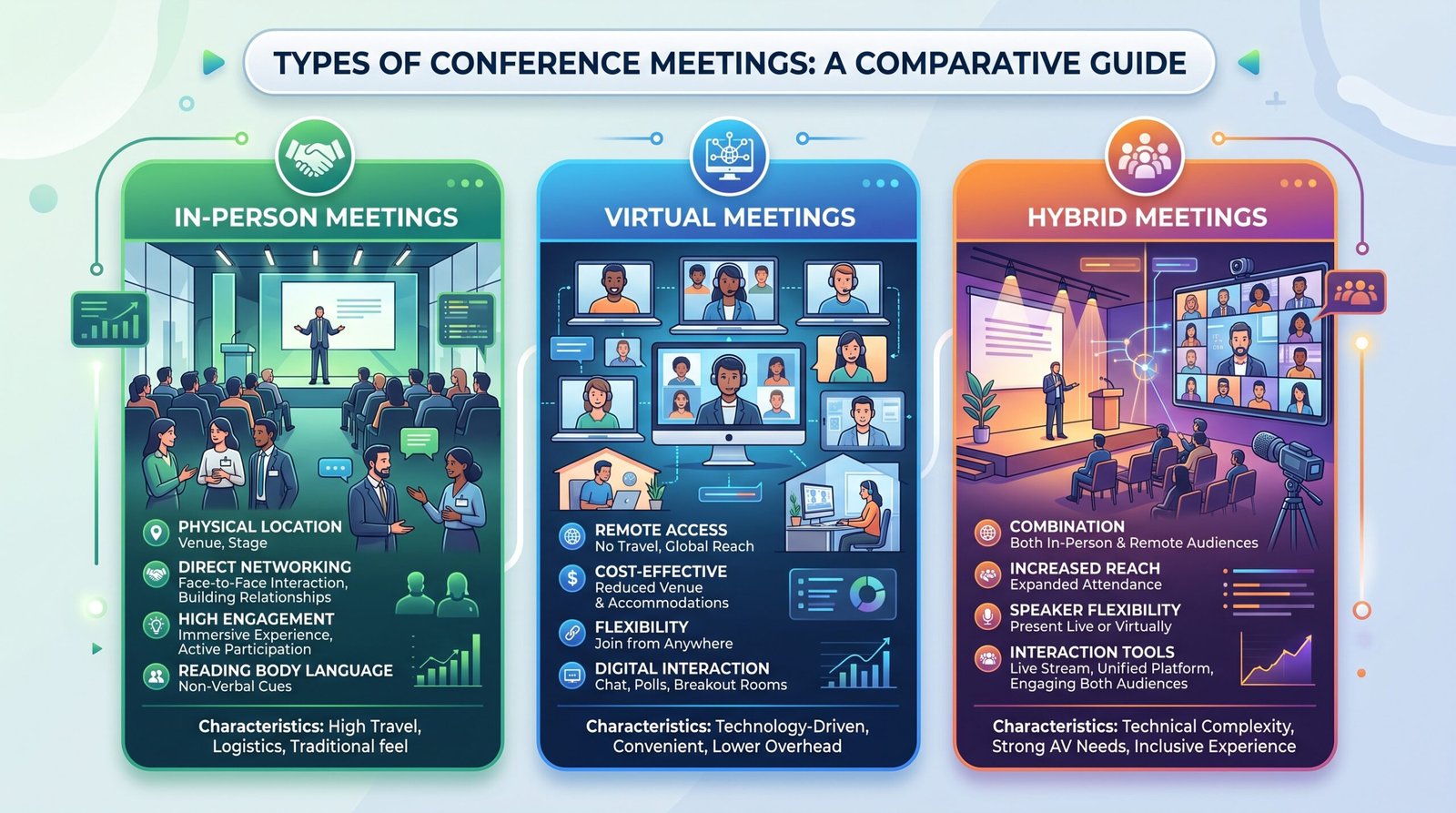
In-Person Conference Meetings
Traditional face-to-face conferences where all participants gather in a physical location.
Advantages:
- Enhanced personal connection and relationship building
- Better non-verbal communication and engagement
- Fewer technical disruptions
- More effective for complex discussions and negotiations
- Easier to facilitate breakout sessions and networking
Best for:
- Annual general meetings
- Strategic planning sessions
- Team-building focused conferences
- Situations requiring hands-on demonstrations
- High-stakes negotiations or sensitive discussions
Typical settings: Corporate conference rooms, hotel conference centers, dedicated event venues, retreat locations
Virtual Conference Meetings
Entirely online conferences conducted through video conferencing platforms, with all participants joining remotely.
Advantages:
- No travel costs or time investment
- Easier to schedule across time zones
- Accessible to geographically dispersed teams
- Easy recording and documentation
- Reduced environmental impact
- Screen sharing enhances presentation quality
Best for:
- Global teams across multiple locations
- Budget-conscious organizations
- Regular quarterly business reviews
- Training and educational conferences
- Organizations with established remote work cultures
Popular platforms: Zoom, Microsoft Teams, Google Meet, Webex, GoToMeeting
Hybrid Conference Meetings
A blend of in-person and virtual participation, where some attendees join physically while others connect remotely.
Advantages:
- Maximum flexibility for participants
- Accommodates travel restrictions or constraints
- Balances personal connection with accessibility
- Expands potential participant pool
- Supports inclusive participation models
Challenges:
- Requires sophisticated audio-visual technology
- More complex facilitation to ensure equal engagement
- Potential for technical difficulties
- Risk of creating “two-tier” participant experiences
Best practices for hybrid:
- Invest in quality microphones and cameras
- Designate a moderator for remote participants
- Use collaboration tools accessible to all
- Test technology extensively before the meeting
- Create engagement opportunities for both groups
Common Purposes of Conference Meetings
Organizations convene conference meetings for various strategic and operational reasons.
Strategic Planning Conferences
These conferences bring together leadership teams and key stakeholders to:
- Define or review organizational vision and mission
- Set annual or quarterly objectives and key results (OKRs)
- Analyze market conditions and competitive landscape
- Allocate resources and budgets
- Identify growth opportunities and potential risks
Typical participants: C-suite executives, department heads, board members, strategic advisors
Frequency: Annually or quarterly
Training and Development Conferences
Focused on learning, skill-building, and professional development:
- Employee onboarding and orientation
- New product or system training
- Compliance and regulatory updates
- Leadership development programs
- Technical skills workshops
Typical participants: Employees from specific departments or levels, trainers, subject matter experts
Frequency: As needed, often quarterly or when introducing new initiatives
Annual General Meetings (AGMs)
Formal conferences required for corporations and organizations to:
- Present annual financial results and reports
- Elect board members or leadership
- Vote on major organizational decisions
- Address shareholder or member concerns
- Review past year’s achievements and next year’s plans
Typical participants: Shareholders, board members, executives, legal counsel
Frequency: Annually, often legally mandated
Industry Conferences and Summits
External-facing conferences that:
- Showcase thought leadership and expertise
- Network with peers and potential partners
- Launch new products or services
- Discuss industry trends and challenges
- Facilitate knowledge sharing across organizations
Typical participants: Industry professionals, clients, partners, media, analysts
Frequency: Annually or bi-annually
Essential Components of a Conference Meeting
Successful conference meetings share several fundamental elements that ensure productivity and effectiveness.
Clear Agenda and Objectives
Every conference meeting must have:
Defined purpose statement: A one-sentence explanation of why the conference is being held
Specific objectives: 3-5 measurable outcomes the conference should achieve
Detailed agenda: Including:
- Topic items with time allocations
- Presenter or discussion leader for each item
- Required pre-reading or preparation
- Decision points or discussion questions
- Break times and networking opportunities
Distribution timeline: Share the agenda 48-72 hours in advance to allow proper preparation
Structured Format and Timeline
Professional conference meetings follow a logical flow:
- Opening (5-10%): Welcome, introductions, agenda review, ground rules
- Content delivery (60-70%): Main topics, presentations, discussions
- Breaks (10-15%): Scheduled refreshment and networking breaks
- Decision-making (10-15%): Voting, consensus building, action planning
- Closing (5%): Summary, next steps, evaluations
Time management: Allocate specific durations to each segment and assign a timekeeper to maintain schedule adherence.
Multiple Participants or Stakeholders
Conference meetings require diverse representation:
- Decision-makers: Those with authority to approve recommendations
- Subject matter experts: Technical specialists providing insights
- Implementers: Those responsible for executing decisions
- Stakeholder representatives: People affected by meeting outcomes
- Facilitators: Neutral parties guiding discussion and process
Optimal size: Research suggests 10-30 participants provide the best balance between diverse perspectives and productive discussion. Larger conferences may use breakout groups for detailed work.
Documentation and Follow-up
Comprehensive record-keeping ensures accountability:
Meeting minutes should capture:
- Attendee list with roles
- Key discussion points
- Decisions made with rationale
- Action items with owners and deadlines
- Unresolved issues requiring further consideration
- Next meeting date and focus
Distribution: Send minutes within 24-48 hours while discussions are fresh
Follow-up mechanisms:
- Action item tracking system
- Scheduled check-ins on progress
- Pre-meeting reports for recurring conferences
- Feedback surveys for improvement
How to Plan an Effective Conference Meeting
Proper planning is the foundation of successful conference meetings. Follow this step-by-step process:
Step 1: Define Your Conference Objectives
Start by asking:
- What specific outcomes must this conference achieve?
- What decisions need to be made?
- What information needs to be shared?
- How will we measure success?
Example objective statement: “This quarterly business review conference will assess Q3 performance against targets, identify obstacles to Q4 success, and align all departments on revised strategies to achieve annual revenue goals.”
Write 3-5 SMART objectives (Specific, Measurable, Achievable, Relevant, Time-bound) that clearly articulate intended outcomes.
Step 2: Choose the Right Format
Select your conference format based on:
- Participant locations: Same office, distributed regionally, or globally dispersed
- Budget constraints: Travel and venue costs vs. technology investment
- Topic sensitivity: Confidential matters may require in-person security
- Engagement requirements: Complex collaboration favors in-person or hybrid
- Accessibility needs: Consider disabilities, time zones, and technology access
Consider hybrid formats for maximum flexibility and inclusion.
Step 3: Select Date, Time, and Venue
For in-person conferences:
- Book venues 4-8 weeks in advance for desired locations
- Verify room capacity, AV equipment, and layout options
- Ensure accessibility compliance
- Confirm catering services if needed
- Check parking and transportation options
For virtual conferences:
- Choose platforms supporting your participant count
- Test bandwidth and features (breakout rooms, polling, recording)
- Verify security and privacy compliance
- Consider time zones for global participants
Scheduling best practices:
- Avoid Monday mornings and Friday afternoons
- Check for conflicting holidays or major events
- Mid-week, mid-morning start times typically see best attendance
- Allow 2-3 weeks minimum notice for participants
Step 4: Create a Detailed Agenda
Build your agenda using this template:
CONFERENCE TITLE
Date, Time, Location/Platform

OBJECTIVES:
[List 3-5 specific objectives]

TIME | TOPIC | PRESENTER | FORMAT
-----|-------|-----------|-------
9:00-9:15 | Welcome & Agenda Review | [Name] | Presentation
9:15-9:45 | [Topic 1] | [Name] | Presentation + Q&A
9:45-10:30 | [Topic 2] | [Name] | Discussion
10:30-10:45 | BREAK | - | -
[Continue...]

REQUIRED PREPARATION:
[List any pre-reading or materials participants should review]

EXPECTED OUTCOMES:
[List decisions or deliverables expected by end of conference]
Agenda development tips:
- Sequence topics logically (foundational information before decisions)
- Allocate more time than you think you’ll need
- Build in buffer time for overruns
- Place highest-priority items early when energy is high
- Include explicit decision points
Step 5: Invite Participants and Speakers
Create professional invitations that include:
- Conference purpose and objectives
- Date, time, and duration
- Location or virtual meeting link
- Agenda (attached or embedded)
- RSVP deadline and method
- Required preparation or pre-reading
- Technology requirements (for virtual meetings)
- Contact person for questions
Send invitations:
- 3-4 weeks in advance for in-person conferences
- 1-2 weeks for virtual conferences
- Follow up with reminders 1 week and 24 hours before
For speakers and presenters:
- Provide presentation guidelines (time limits, format, template)
- Schedule prep calls to review content
- Request materials 1 week in advance for review
- Conduct technical run-throughs for critical presentations
Step 6: Prepare Materials and Technology
For all conference meetings:
- Prepare presentation slides and handouts
- Create participant packets or digital folders
- Set up collaboration tools (shared documents, whiteboards)
- Prepare evaluation forms or surveys
- Develop backup plans for technology failures
For in-person conferences:
- Test all AV equipment in advance
- Arrange room setup (theater, classroom, roundtable, etc.)
- Prepare name tags and signage
- Coordinate catering and refreshments
- Create printed agendas and materials
Fr virtual conferences:
- Send calendar invites with correct meeting links
- Test platform features (screen sharing, breakout rooms, polling)
- Prepare virtual backgrounds if appropriate
- Brief presenters on platform functionality
- Have technical support contact available
- Send connection instructions and troubleshooting guide
Best Practices for Running Conference Meetings
Execution quality determines whether your well-planned conference achieves its objectives.
Start and End on Time
Respecting participants’ time demonstrates professionalism and sets expectations:
Opening on schedule:
- Begin exactly at stated time, even if some haven’t arrived
- Brief latecomers during first break rather than disrupting flow
- Establish punctuality culture by consistent modeling
Staying on track:
- Display visible timer or clock
- Provide 5-minute warnings before topic transitions
- Use a timekeeper role to maintain accountability
- Table tangential discussions for follow-up
Closing as planned:
- Reserve final 10 minutes for wrap-up regardless of agenda completion
- Summarize key outcomes and next steps
- Schedule follow-up for unfinished items
- End at promised time to maintain credibility
Facilitate Engagement and Participation
Passive listening produces poor outcomes. Actively involve participants:
Engagement techniques:
- Direct questions: Call on specific individuals by name for input
- Round-robin: Have each person share perspective on key issues
- Think-pair-share: Brief individual reflection, then partner discussion, then group sharing
- Polling and voting: Use digital tools for real-time input and decision-making
- Breakout groups: Divide large conferences into smaller discussion teams
- Role-playing: Assign perspectives to explore issues from different angles
Creating psychological safety:
- Establish “no wrong answers” culture
- Thank people for contributions, especially dissenting views
- Prevent dominant voices from monopolizing discussion
- Use anonymous input tools for sensitive topics
- Address conflicts constructively and respectfully
Virtual engagement specifics:
- Use chat function for questions and comments
- Enable gallery view to see all faces
- Request cameras on when possible
- Use reaction emojis and virtual hand-raising
- Create interactive elements every 10-15 minutes
Use Visual Aids and Presentations
Visual elements enhance comprehension and retention:
Effective presentation design:
- One main idea per slide
- Minimal text (6-8 words per line, 6 lines maximum)
- High-contrast colors for readability
- Relevant images, charts, and graphs
- Consistent formatting and branding
Beyond slides:
- Physical or digital whiteboards for brainstorming
- Live demonstrations when applicable
- Video clips (keep under 3 minutes)
- Infographics and visual frameworks
- Real-time data dashboards
Accessibility considerations:
- Provide alt text for images
- Use readable fonts (minimum 24pt for presentations)
- Verbally describe visual elements
- Offer materials in multiple formats
Assign Roles (Facilitator, Timekeeper, Note-taker)
Distributed responsibilities improve meeting quality:
Facilitator/Moderator:
- Guides discussion and maintains focus
- Ensures balanced participation
- Manages conflicts and tangents
- Maintains neutral stance on content
- Synthesizes input and builds consensus
Timekeeper:
- Monitors agenda adherence
- Provides warnings before transitions
- Recommends adjustments if falling behind
- Protects time for priority items
Note-taker/Recorder:
- Documents key discussion points
- Captures decisions and rationale
- Records action items with owners and dates
- Notes parking lot items for future consideration
- Creates and distributes meeting minutes
Presenter/Subject Matter Expert:
- Delivers content on specific topics
- Answers technical questions
- Provides data and analysis
- Recommends solutions or approaches
Technical Support (for virtual/hybrid):
- Manages platform settings and features
- Troubleshoots participant connection issues
- Manages breakout rooms and recordings
- Monitors chat for technical questions
Assign these roles in advance and brief role-holders on expectations.
Common Conference Meeting Challenges and Solutions
Even well-planned conferences encounter obstacles. Here’s how to address common issues:
Low Attendance or Engagement
Symptoms:
- Many invitees decline or don’t respond
- Participants are physically present but mentally disengaged
- Minimal contribution during discussions
- Multitasking on phones or laptops
Root causes:
- Meeting purpose unclear or irrelevant to attendees
- Poor timing or scheduling conflicts
- History of unproductive meetings
- No perceived personal benefit
- Lack of psychological safety
Solutions:
- Before the meeting:
- Clearly communicate why each person’s attendance matters
- Invite only essential participants
- Schedule considerately and offer alternatives
- Share compelling agenda with clear relevance
- Assign pre-work to create investment
- During the meeting:
- Start with energizing opener or icebreaker
- Directly solicit input from quiet participants
- Use interactive formats rather than lecture-style
- Take breaks to maintain energy
- Acknowledge and appreciate contributions
- Long-term:
- Build reputation for productive meetings
- Act on previous meeting decisions to show impact
- Gather feedback and continuously improve
- Celebrate successes achieved through conference outcomes
Running Over Time
Symptoms:
- Consistently finishing 15+ minutes late
- Rushing through final agenda items
- Skipping breaks or important topics
- Participants leaving before conclusion
Root causes:
- Unrealistic time estimates
- Lack of time enforcement
- Tangential discussions
- Dominant speakers consuming disproportionate time
- Poor agenda design
Solutions:
- Planning phase:
- Build in 15-20% buffer time
- Allocate time based on priority, not perceived need
- Limit agenda to realistic scope
- Consider multi-session approach for complex topics
- During meeting:
- Empower timekeeper to interrupt diplomatically
- Use “parking lot” for off-topic but valuable discussions
- Offer to take detailed discussions offline
- Ask permission to extend if absolutely necessary
- Prioritize remaining items if running late
- Techniques:
- Display countdown timer visibly
- Set interval alarms (smartphone vibrations)
- Use timed discussion rounds
- Adopt “timeboxing” methodology
- End each segment before starting next
Technical Difficulties
Symptoms (particularly for virtual/hybrid):
- Audio feedback or poor sound quality
- Video freezing or buffering
- Participants unable to join
- Screen sharing failures
- Lost recordings or chat logs
Root causes:
- Inadequate bandwidth or infrastructure
- Incompatible devices or software versions
- Lack of technical preparation
- User inexperience with platform
- No backup plan
Solutions:
- Preventive measures:
- Conduct technical dry runs 24-48 hours before
- Send detailed connection instructions in advance
- Require participants to test equipment beforehand
- Have IT support on standby
- Choose reliable, widely-used platforms
- Ensure venue has adequate internet bandwidth
- During meeting responses:
- Have backup communication method (phone conference line)
- Designate technical troubleshooter separate from facilitator
- Keep presentation files available in multiple formats
- Use chat function if audio fails
- Record backup audio separately
- Remain calm and professional during disruptions
- For hybrid specifically:
- Invest in quality conference room microphones and cameras
- Position remote participants on large display
- Assign advocate for remote attendee experience
- Test all connections before participants arrive
Unclear Action Items
Symptoms:
- Post-meeting confusion about responsibilities
- Missed deadlines or incomplete follow-through
- Different interpretations of decisions
- Repeated discussions of “resolved” issues
Root causes:
- Vague decision documentation
- No explicit ownership assignment
- Unrealistic timelines
- Lack of accountability mechanisms
- Decisions made without resources allocated
Solutions:
- During meeting:
- Use consistent action item template:
- WHAT exactly needs to be done
- WHO is responsible (single owner, not committee)
- WHEN is the deadline
- WHAT resources are available
- HOW will completion be verified
- Verbally confirm understanding before closing
- Review all action items before adjournment
- Identify dependencies between action items
- Use consistent action item template:
- Documentation:
- Use standard format in meeting minutes
- Highlight action items visually (color, bold, separate section)
- Create separate action item tracker
- Distinguish between “responsible” and “consulted” parties
- Follow-up:
- Send action item summary within 24 hours
- Schedule check-in meetings or status reports
- Add items to project management systems
- Create accountability through visibility
- Celebrate completed items in subsequent conferences
Conference Meeting Technology and Tools
The right technology stack enhances conference effectiveness and participant experience.
Video Conferencing Platforms
Zoom
- Best for: Virtual conferences of all sizes, webinars
- Key features: Breakout rooms, polling, recording, virtual backgrounds, 1000+ participant capacity
- Strengths: User-friendly, reliable, extensive features
- Considerations: Security settings require attention
Microsoft Teams
- Best for: Organizations using Microsoft 365 ecosystem
- Key features: Integration with Office apps, channels, persistent chat, together mode
- Strengths: Seamless document collaboration, enterprise security
- Considerations: Learning curve for complex features
Google Meet
- Best for: Google Workspace users, simple virtual meetings
- Key features: Calendar integration, live captions, noise cancellation
- Strengths: Simple interface, no software installation, tight Google integration
- Considerations: Fewer advanced features than competitors
Webex
- Best for: Large enterprise conferences, regulated industries
- Key features: Advanced security, large meeting capacity, translation
- Strengths: Enterprise-grade reliability and security
- Considerations: Higher cost, more complex setup
Selection criteria:
- Participant capacity needed
- Security and compliance requirements
- Integration with existing tools
- Budget constraints
- Required features (breakout rooms, polling, etc.)
- User technical sophistication
Meeting Management Software
Fellow
- Purpose: Meeting agenda creation, note-taking, action item tracking
- Key features: Templates, collaborative agendas, integration with calendars and project tools
- Best for: Recurring conferences with consistent structure
Notion
- Purpose: All-in-one workspace for meeting documentation
- Key features: Customizable templates, databases, collaboration
- Best for: Organizations wanting flexible, comprehensive documentation
Hugo
- Purpose: Meeting note-taking connected to calendar
- Key features: Automatic meeting detection, searchable notes, integrations
- Best for: Busy professionals attending many conferences
Lucid Meetings
- Purpose: End-to-end meeting management
- Key features: Templates, room management, analytics
- Best for: Organizations wanting to improve meeting culture systematically
Collaboration and Documentation Tools
Real-time collaboration:
- Miro/Mural: Virtual whiteboarding for brainstorming and visual collaboration
- Google Docs/Microsoft Word Online: Simultaneous document editing
- Mentimeter/Slido: Live polling, Q&A, and audience interaction
- Jamboard: Digital collaborative whiteboard
Project and task management:
- Asana: Action item tracking and project management
- Trello: Visual board-based task organization
- Monday.com: Workflow and progress tracking
- Jira: Technical project management with detailed tracking
Documentation and knowledge management:
- Confluence: Team knowledge base and documentation
- Evernote: Note organization and sharing
- Dropbox Paper: Collaborative documents with multimedia
- SharePoint: Enterprise document management
Scheduling and coordination:
- Calendly: Easy meeting scheduling with availability detection
- Doodle: Group scheduling and polling
- When2meet: Visual availability comparison
Recommended conference tech stack:
- Video conferencing platform (Zoom, Teams, or Google Meet)
- Collaborative documentation tool (Google Docs or Notion)
- Interactive engagement tool (Mentimeter or Slido)
- Action item tracker (Asana or integrated meeting management software)
- Visual collaboration space (Miro or Mural)
Frequently Asked Questions About Conference Meetings
What is the difference between a meeting and a conference?
A conference meeting is typically larger in scale, involves multiple stakeholders or departments, follows a formal structure, and focuses on significant topics like strategic planning or organizational decisions. Regular meetings are usually smaller, less formal, and focus on routine business matters or team updates. Conference meetings require more extensive planning, formal agendas, comprehensive documentation, and often involve presentations from multiple speakers.
How long should a conference meeting last?
Most conference meetings last between 1-4 hours, depending on the agenda and objectives. Half-day conferences (3-4 hours) are ideal for quarterly business reviews or strategic planning sessions, while full-day conferences (6-8 hours) suit annual meetings or comprehensive training programs. Virtual conference meetings should typically be shorter—60-90 minutes maximum—to maintain engagement, as screen fatigue sets in more quickly than in-person attention loss. For complex topics requiring longer timeframes, consider breaking virtual conferences into multiple shorter sessions across different days.
What is the ideal number of participants for a conference meeting?
Conference meetings typically involve 10-100+ participants, depending on the purpose and format. For strategic decision-making conferences, 10-30 key stakeholders provide the optimal balance between diverse perspectives and productive discussion. Training or informational conferences can accommodate 50-100+ participants since they require less interactive discussion. Virtual conferences can effectively support larger groups due to features like breakout rooms and chat functions. When participant counts exceed 30, consider using breakout groups for detailed discussion and reserving full-group time for presentations and key decisions.
Do I need an agenda for a conference meeting?
Yes, a detailed agenda is absolutely essential for conference meetings. The agenda should outline all topics, time allocations, designated speakers or discussion leaders, and expected outcomes. Distribute the agenda at least 48-72 hours before the conference to allow participants adequate preparation time. Include any required pre-reading materials, background documents, or data that attendees should review. A well-designed agenda keeps the conference focused, helps manage time effectively, sets clear expectations, and significantly improves the likelihood of achieving your conference objectives.
What technology do I need for a virtual conference meeting?
For virtual conference meetings, you’ll need: (1) A reliable video conferencing platform such as Zoom, Microsoft Teams, or Google Meet that supports your participant count; (2) Stable high-speed internet connection with minimum 5-10 Mbps upload/download speeds; (3) Quality audio equipment—a dedicated USB microphone or headset with microphone provides much better sound than built-in computer mics; (4) HD webcam if not using laptop’s built-in camera; (5) Screen sharing capability for presentations; (6) Collaboration tools like digital whiteboards (Miro), polling software (Mentimeter), or shared documents (Google Docs). Test all technology at least 24 hours before the conference and have IT support available during the meeting.
How do you run an effective conference meeting?
Run effective conference meetings by following these practices: (1) Set crystal-clear objectives and communicate them in advance; (2) Create and distribute a detailed, time-allocated agenda 48-72 hours beforehand; (3) Start and end exactly on time to respect participants’ schedules; (4) Assign specific roles including facilitator, timekeeper, and note-taker; (5) Use interactive engagement techniques like polling, breakout discussions, and direct questioning to maintain participation; (6) Employ visual aids and presentations to enhance understanding; (7) Document all decisions and action items with clear ownership and deadlines; (8) Distribute comprehensive meeting minutes within 24-48 hours; (9) Follow up on action items with accountability mechanisms; (10) Gather feedback after each conference to continuously improve your process.
How far in advance should you schedule a conference meeting?
For in-person conference meetings, schedule 3-4 weeks in advance to allow participants to arrange travel, clear calendars, and prepare adequately. Complex conferences involving multiple executives, external stakeholders, or requiring venue booking may need 6-8 weeks or more. Virtual conference meetings can be scheduled with shorter notice—typically 1-2 weeks is sufficient since no travel arrangements are required. For recurring conferences (quarterly business reviews, annual planning sessions), establish dates for the entire year in advance. Send initial save-the-date notices early, then follow up with detailed agendas and materials closer to the conference date. Always send reminder notifications 1 week and 24 hours before the conference.
What should be included in conference meeting minutes?
Comprehensive conference meeting minutes should include: (1) Meeting metadata—date, time, location/platform, list of attendees and absentees; (2) Agenda items discussed with brief summaries of key points; (3) All decisions made, including the rationale and any dissenting opinions; (4) Action items with specific owners, deadlines, and success criteria; (5) Issues requiring further discussion or investigation (parking lot items); (6) Important data, statistics, or information shared; (7) Next meeting date and preliminary agenda topics; (8) Any votes taken with results; (9) Key announcements or organizational updates. Distribute minutes within 24-48 hours while discussions are fresh in participants’ minds, and maintain a centralized repository where all conference documentation can be accessed.
Conclusion: Making Conference Meetings More Productive
Conference meetings represent significant investments of organizational time, resources, and attention. When executed effectively, they align teams, drive strategic decisions, solve complex problems, and propel organizations forward. When poorly managed, they waste countless hours and create frustration.
The difference between productive and wasteful conference meetings comes down to intentionality in three key areas:
Purposeful planning: Successful conferences begin with clear objectives and comprehensive preparation. Define exactly what you need to accomplish, who must be involved, and what format will best serve your goals. Create detailed agendas that respect participants’ time and intelligence. Prepare materials that inform without overwhelming.
Skillful facilitation: Great conference execution requires designated roles, time discipline, engagement techniques, and adaptive leadership. The best facilitators balance structure with flexibility, ensuring all voices are heard while keeping discussions focused on outcomes. They create environments where diverse perspectives can emerge and productive debate can occur.
Start improving your conference meetings today by implementing just one practice from this guide. Choose the area with the biggest gap in your current approach—whether that’s clearer agendas, better time management, enhanced technology, or stronger follow-up—and commit to excellence in that dimension. Then systematically address other elements until conference meetings become your organization’s competitive advantage rather than its time-consuming burden.
The most successful organizations don’t just hold conference meetings—they engineer purposeful convenings that unlock collective intelligence and drive meaningful progress.